Let's keep coding more bots.
All posts of the series:
- Gentle introduction to Telegram Bots.
- Bot Revolution. Know your API or die hard.
- Start coding some simple bots.
- Let's keep coding more bots.
Hello Friend, it's been a long time without writing, but here we are, coding some more bots :)
The other day some one talked to me in Telegram asking me to write some more posts with more complex bots, and... well, let's program! =D
The idea
First of all, we need the idea to build the bot, without it, we won't be able to write anything.
Let's start with some intermediate-idea, just some ask-answer bot, without database or API connections to get started in this world.
And a really simple ask-answer bot is a trivia bot.
Break it in parts
So, let's think about the idea.
The bot will have some questions with the answers and the solution, this will be loaded at startup or hard-coded in the code. When the user asks for a question, the bot will get a random one, and send it, with a keyboard with the possible answers, and replying to the message. And finally, when the user answers, we should check if it's the correct one, and answer if it's right or wrong.
So...
- In-memory "database", with questions and answers
- Handler to send a question
- Handler to receive the answer
With this we have some parts to start coding, let's go!
The Data are your friend
To save and build the questions we are going to use a struct, for example:
type question struct {
    Question string   `json:"question"`
    Answers  []string `json:"answers"`
    Solution int      `json:"solution"`
}
Here we are defining a struct question, with the "q" in lowercase, so it's not an exported struct, that have three fields, a Question that is an string, some Answers that is a list of strings, and a Solution, that is just the position in the answers where the good answer is (starting in zero, because we are programmers).
Let's define a first "database":
var questions = []question{
    question{"Current year?", []string{"1994", "2015", "2016", "2017"}, 2},
}
A simple question, with some answers, and the index of the good answer.
I have some questions...
Before we code the function to send the question/answers, we need to build the bot and the handler, as we saw in the previous post, this is really easy:
func main() {
    token := ""

    bot := tgbot.New(token).
        SimpleCommandFn(`question`, questionHandler)

    bot.SimpleStart()
}
Just the main function, with a token variable, we create the bot with the token, and set the handler with a Simple Command, so that handler will be executed with /question and /question@usernamebot.
To start the handler, because this is a Simple Command, the initial function is like this:
func questionHandler(bot tgbot.TgBot, msg tgbot.Message, text string) *string {

    return nil
}
What do we need to do? First, choose a random question, then build the keyboard, and at last send the question with the keyboard.
To choose a random question we are going to use rand.Intn, to build the keyboard, that are of type [][]string, we will define a function to transform a []string into that with two strings top, and then build the tgbot.ReplyKeyboardMarkup.
- Choose the random number:
r := rand.Intn(len(questions))
choosen := questions[r]
- Function to transform a list of strings into a list of lists with at max two strings in the inner lists:
func buildKeyboard(ops []string) [][]string {
    keylayout := [][]string{{}}
    for _, k := range ops {
        if len(keylayout[len(keylayout)-1]) == 2 {
            keylayout = append(keylayout, []string{k})
        } else {
            keylayout[len(keylayout)-1] = append(keylayout[len(keylayout)-1], k)
        }
    }
    return keylayout
}
- Build the keyboard (selective false and resize false):
keyl := buildKeyboard(choosen.Answers)
rkm := tgbot.ReplyKeyboardMarkup{
    Keyboard:        keyl,
    ResizeKeyboard:  false,
    OneTimeKeyboard: true,
    Selective:       false,
}
- Send it!
bot.Answer(msg).Text(choosen.Question).ReplyToMessage(msg.ID).Keyboard(rkm).End()
- Sum it up:
func questionHandler(bot tgbot.TgBot, msg tgbot.Message, text string) *string {
    r := rand.Intn(len(questions))
    choosen := questions[r]

    keyl := buildKeyboard(choosen.Answers)
    rkm := tgbot.ReplyKeyboardMarkup{
        Keyboard:        keyl,
        ResizeKeyboard:  false,
        OneTimeKeyboard: true,
        Selective:       false,
    }

    usersAnswering.set(msg.Chat.ID, r)

    bot.Answer(msg).Text(choosen.Question).ReplyToMessage(msg.ID).Keyboard(rkm).End()

    return nil
}
We can test how it's going the bot! If you named the file main.go and the token is set in the variable, just execute go run main.go.
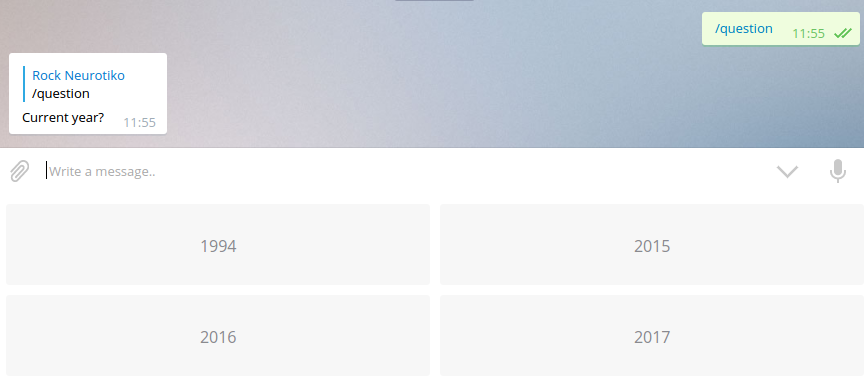
Ok, that wasn't that hard =D
Concurrency. In the beginning was everything.
At this point, our user will receive the question and the answers, and we want to get, process and know if the answer is right.
And we are facing our first not-expected problem... How do we know what question the user is answering so we know if it's correct? Even more, how do we even know if the user is answering any question?
We need to save, in some way, if the user is answering AND some kind of reference to the question.
Our first approach can be: just have a global map[int]int where you save in the key the user and in the value the question number, and this is not bad at all — actually we are going to use something similar. But when you are used to building web apps with many users using it at the same time, and your app is concurrent... you are in trouble.
In Go, for something so simple like this, we can build a really simple concurrent data structure using sync.RWMutex. In this way the write operations will be blocking, but the read operations won't.
Thanks to struct embedding in Go, we can declare our data structure this way:
type usersAnsweringStruct struct {
    *sync.RWMutex
    Users map[int]int
}
And let's create a global instance of this struct:
var usersAnswering = usersAnsweringStruct{&sync.RWMutex{}, make(map[int]int)}
In this way, when we want to read something we just need to do:
usersAnswering.RLock()
// Use usersAnswering.Users
usersAnswering.RUnlock()
But in my experience, it's much easier to provide an easy-to-use API over the structure. We are going to need get, set and del:
- get — RLock, read, RUnlock, return results. (We call
RUnlockmanually instead ofdeferbecause it's faster in this simple case with no complex branching.)
func (users *usersAnsweringStruct) get(user int) (int, bool) {
    users.RLock()
    i, ok := users.Users[user]
    users.RUnlock()
    return i, ok
}
- set — Lock, set, Unlock (write lock):
func (users *usersAnsweringStruct) set(user int, value int) {
    users.Lock()
    users.Users[user] = value
    users.Unlock()
}
- del — same as set but deleting the key:
func (users *usersAnsweringStruct) del(user int) {
    users.Lock()
    delete(users.Users, user)
    users.Unlock()
}
We now have a clean interface over our concurrent data structure. We can do things like usersAnswering.del(userID) without thinking about concurrency at all — it's all handled!
Don't forget to save that the user is answering in questionHandler by adding usersAnswering.set(msg.Chat.ID, r) before the bot answer (already shown in the full questionHandler above).
Do you have my answer?
This handler is tricky because it will be human-text input, not a command, and we can't easily build a regexp for it. We are going to use the NotCalledFn handler — it will be called if none of the other handlers matched:
bot := tgbot.New(token).
    SimpleCommandFn(`question`, questionHandler).
    NotCalledFn(maybeAnswerHandler)
The NotCalled handler is very generic. Let's write it:
func maybeAnswerHandler(bot tgbot.TgBot, msg tgbot.Message) {
    // Make sure the message has text
    if msg.Text == nil {
        return
    }

    text := *msg.Text

    // Get the user's current question from our cache
    i, ok := usersAnswering.get(msg.Chat.ID)

    usersAnswering.del(msg.Chat.ID) // We can safely remove right now

    if !ok || i < 0 || i >= len(questions) {
        bot.Answer(msg).Text("You need to start a /question first").End()
        return
    }

    // Check if the answer is correct
    choosen := questions[i]
    goodone := choosen.Answers[choosen.Solution]

    if text == goodone {
        bot.Answer(msg).Text("SUCCESS!").End()
        return
    }

    bot.Answer(msg).Text("WRONG!").End()
}
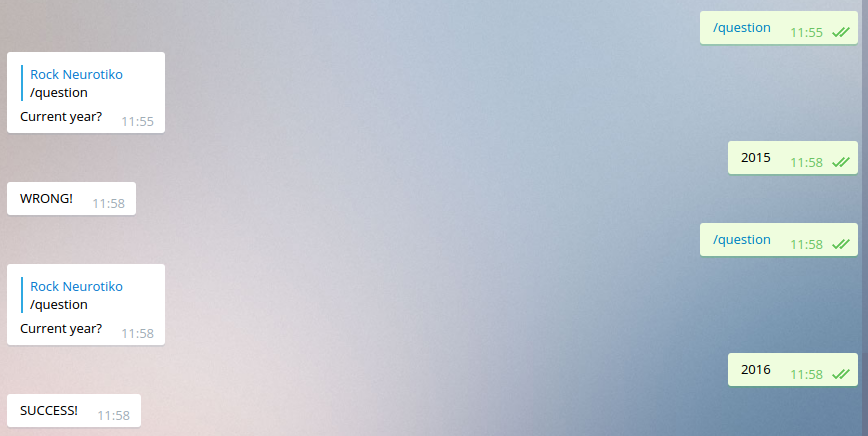
Let's see how it looks:
Final thoughts
You can see the full code in my repository.
If you want to improve the bot, here are some ideas:
- Load the questions and the token from a JSON file like:
{
    "token": "AABBABBABA",
    "questions": [{
        "question": "The question?",
        "answers": ["answer1", "answer2", "answer3"],
        "solution": 1
    }, {
        "question": "The question 2?",
        "answers": ["answer4", "answer5", "answer6"],
        "solution": 0
    }]
}
- Check that the text in the answer is not a command
- On startup, validate that all solutions are within the range of the answers array
- Allow an admin to add questions via bot commands
- Save success/fail counts per chat and provide stats and rankings
- Use a trivia API to get questions, like this one
- For more on Go concurrency patterns, build the data synchronization using a goroutine and channel instead of a mutex. Check out this great blog post for visualization.
Thanks!
And that's all!
It wasn't that hard, was it?
All you need to do now is program your own bots and let your imagination fly ;-)